Say it once. The route works out the rest.
A list of stops, or just kinds of places, becomes one route with a time at every stop. Exact addresses or "a gas station". Leave at nine or be there by two. Stops you can move and stops you cannot.
No sign-up. Three routes a month free. Your stops stay in your browser.
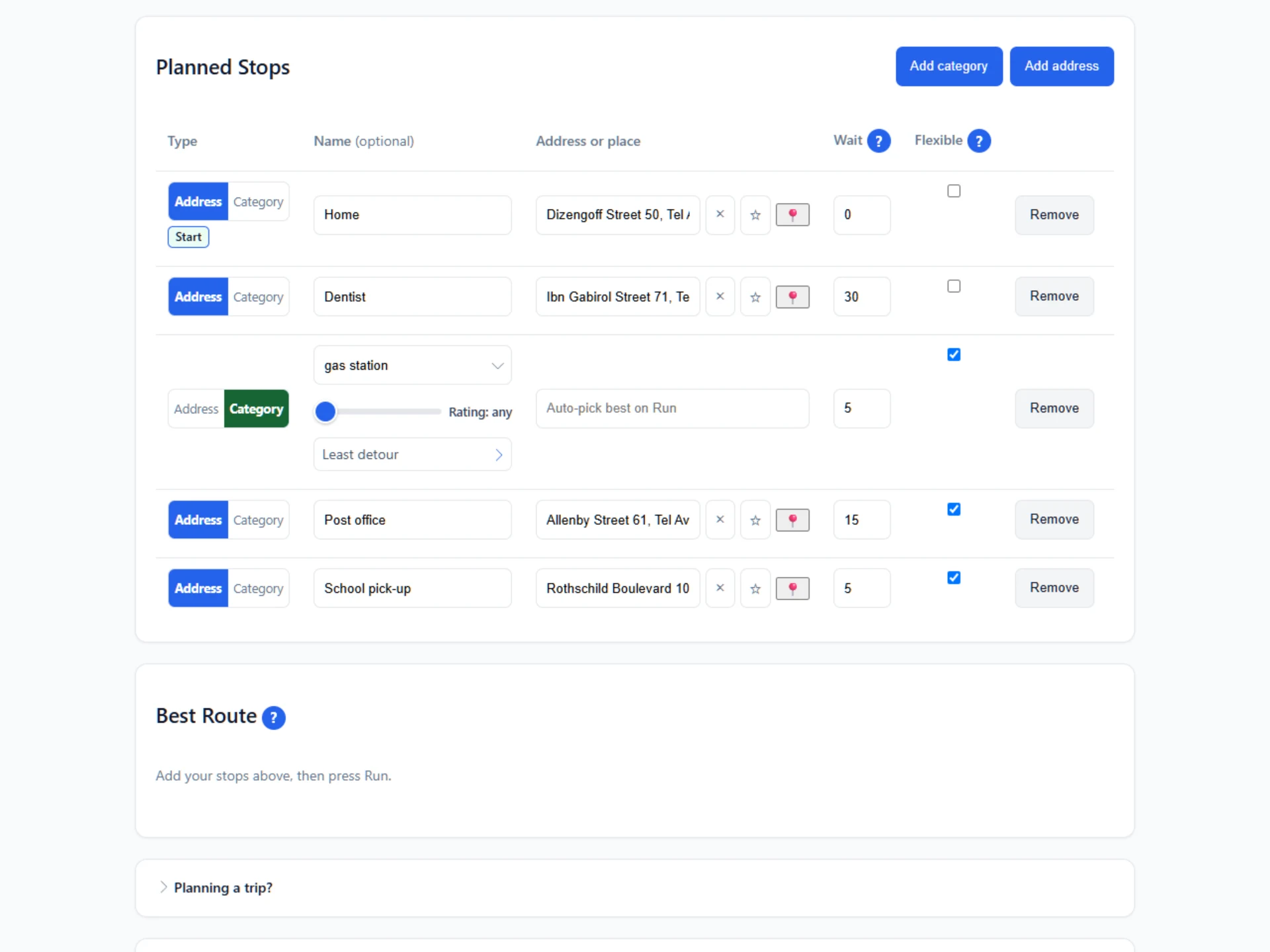
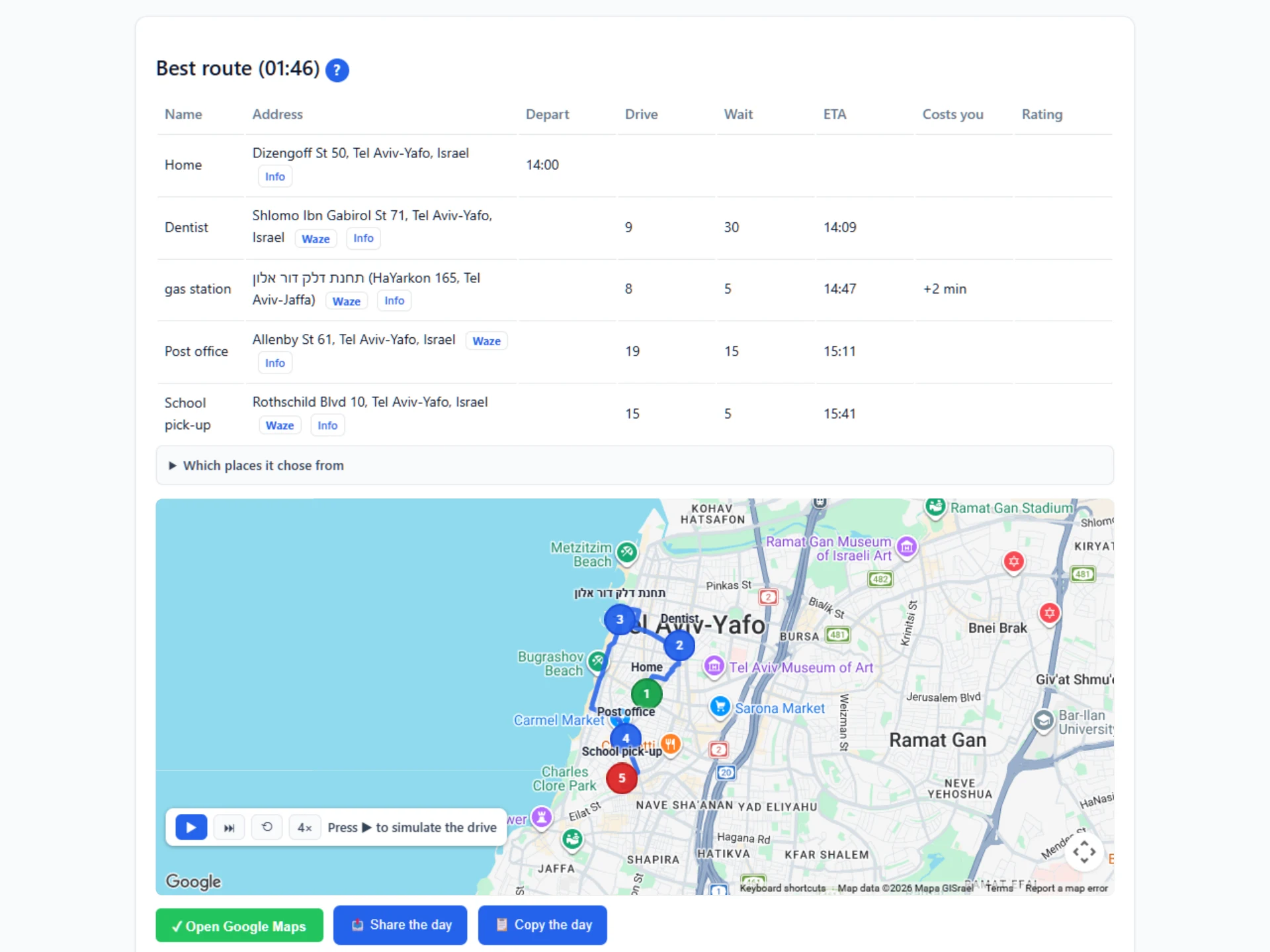
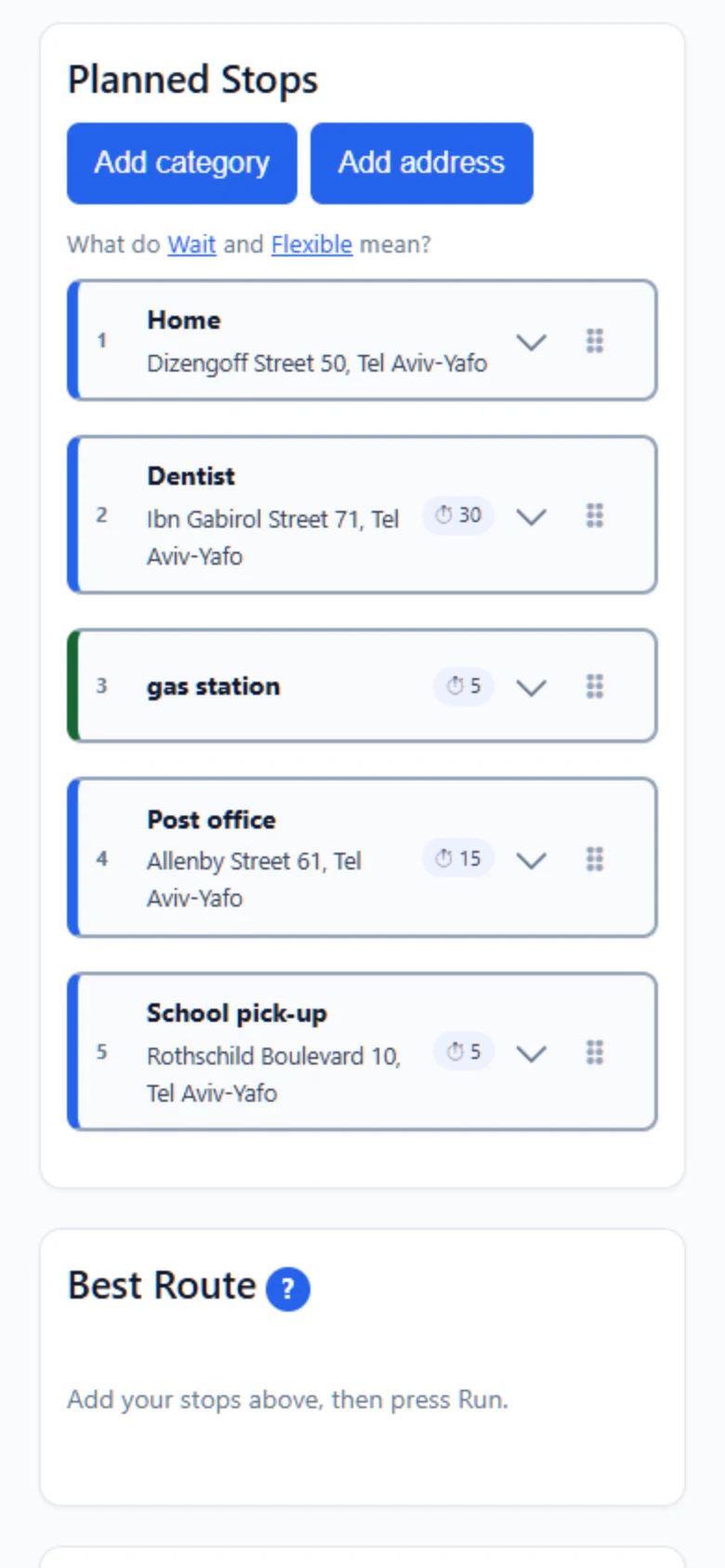
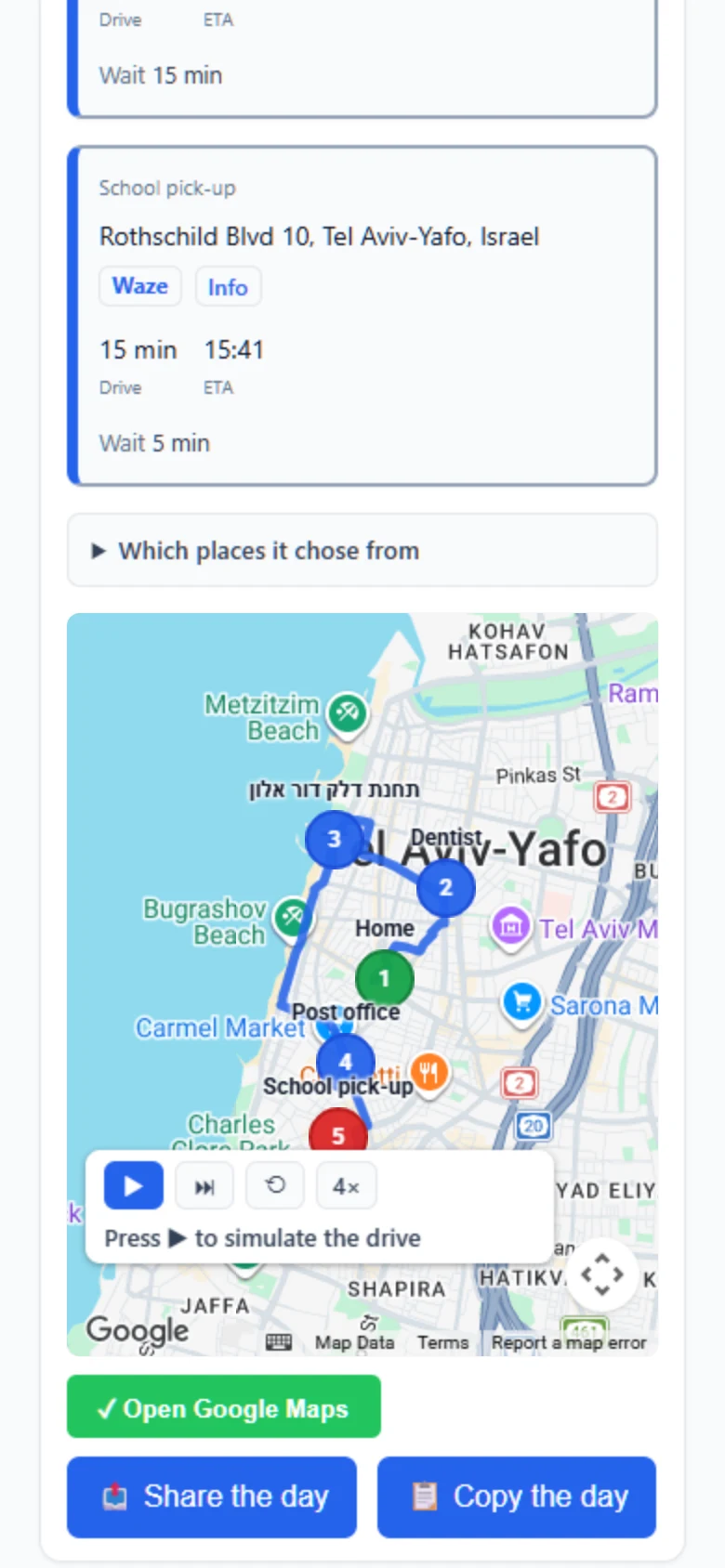
What is Navido?
Navido is a route planner that takes kinds of places as stops. You type the stops, or pick the kind of place you need, set when you leave or when you must arrive, and it finds what is open, picks the one on your way, puts everything in the best order, and gives a time and a distance at every stop, with a Google Maps link to drive or walk it.
How a route gets built
Six things decide what you end up driving, and every one of them is on screen.
A stop can be a kind of place
Type an address or the name of a shop. Or switch the stop to Category and say what you need: a pharmacy, a cash machine, a coffee cart. Navido chooses which one while it plans the day.
The minutes inside a stop count
Put 20 in the Wait box on the pharmacy and every arrival after it moves 20 minutes later. That is the arithmetic that makes the arrival times the ones you will really see.
You choose which stops may move
Every stop starts ticked as Flexible, so Navido is free to place it anywhere in the day. Untick the dentist and it keeps its place in the day. The route shows when you will get there.
Every option says what it costs your day
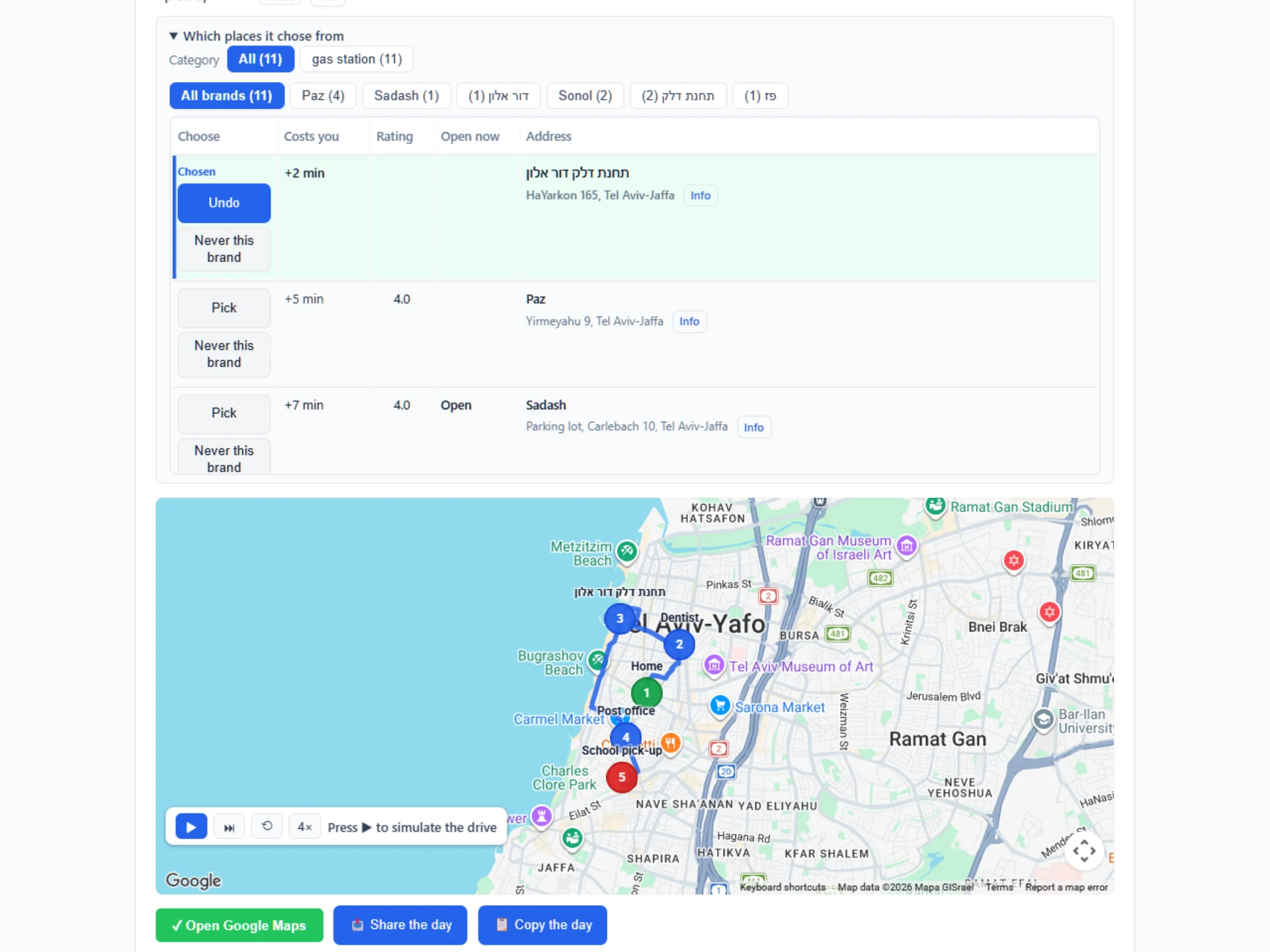
Beside each place it found: +7 min. That is the time the stop adds to the whole drive, not the distance to it, so a station just off a long leg can cost you less than one behind you.
A brand rule is set once
Name the brands a kind of stop may be, and the brands it may never be. Navido keeps the rule and uses it on every route after that.
It reads the hours for when you arrive
Navido checks a place’s opening hours for the moment you would walk in, not for now, and writes what it found on the route. The hours are read on the clock at the place, so a day abroad comes out right.
Say which brands, once
A fuel card that only works at Dor Alon makes every other station useless, so being sent to a Paz is worse than not stopping at all. Tell Navido once, for that kind of stop: the brands it may be, the brands it may never be, and whether that list is a preference or the only thing it may choose. It holds for every route after it.
- For example, only Dor Alon, because the company's fuel tag only works at that chain.
- Never McDonald's, and you never scroll past one again.
- Prefer Paz, and take the next station along when there is no Paz near your way.
Set it on the stop itself, or under Advanced, where a kind of place can be added with nothing in the plan at all. When a rule leaves nothing near your way, the rest of the day is still planned with its times, and that one stop says so, with a button to use any brand for this route only. Your saved rule stays as it was.
Open Navido, free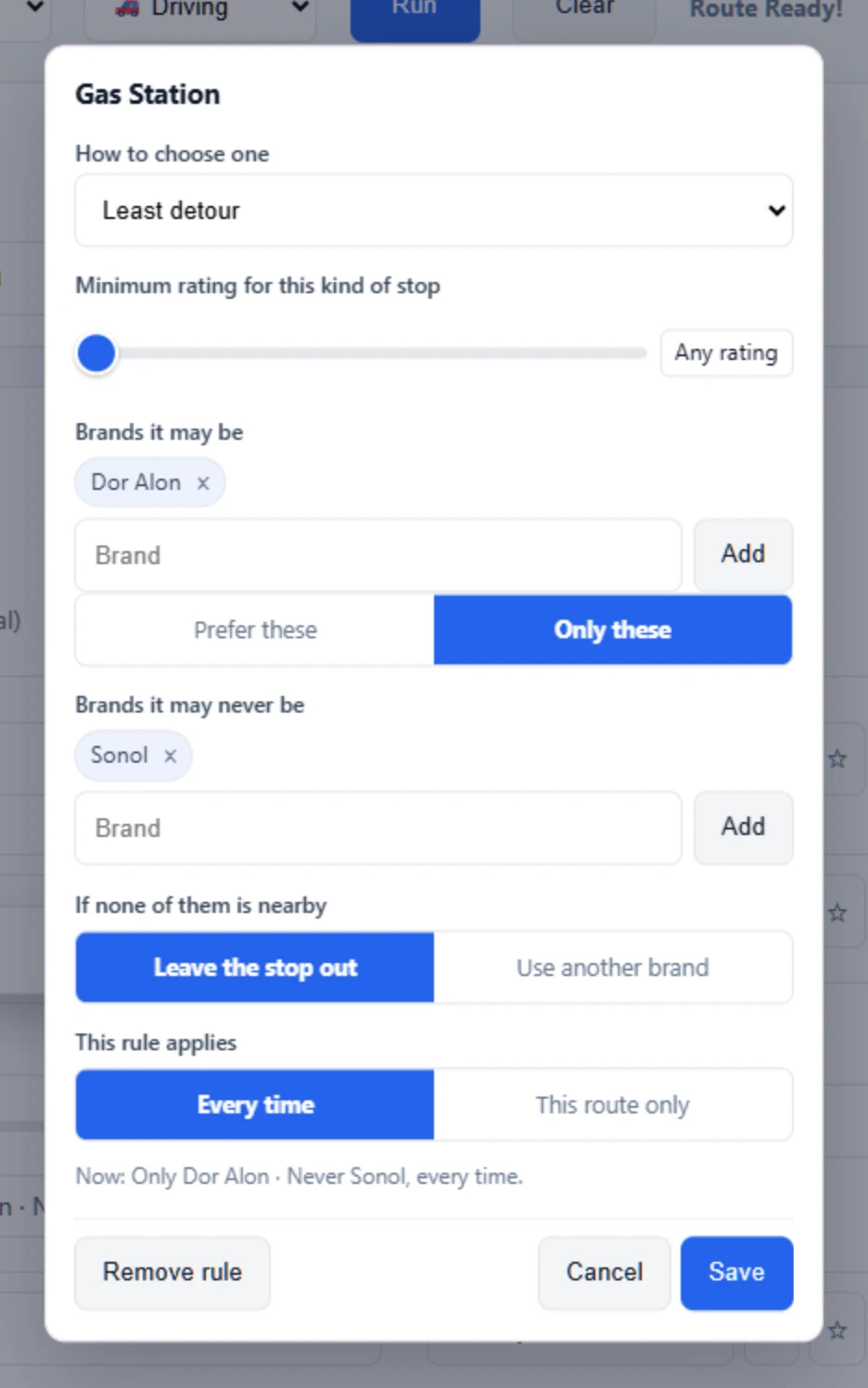
Pick the day you are planning
Navido has two front doors. Choose one, and its page walks you through that kind of day step by step. The same app is behind both.
A day of errands
A normal afternoon, four stops, one deadline. Type the stops, or pick the kind of place, and drive the one route that fits.
See how errands workA trip
A city you do not know, on foot, for four days. Pick attractions by category, walk, save each day, send it to the family.
See how a trip worksWhat does it cost?
Free
- 3 routes a month, or 10 on your own Google key
- Up to 8 stops
- One category stop per route
- Re-planning a day you already ran is free
Plus
- 15 routes a month, or 50 on your own Google key
- Up to 25 stops
- As many category stops as you like
- Nothing to set up, and re-planning a day is free
Pro
- 100 routes a month, or no limit on your own Google key
- Up to 99 stops on one route
- For anyone who plans a full day, every day
- Nothing to set up
Try it with your own afternoon.
Two addresses and one "gas station" is enough to see it work. Nothing to install, nothing to sign.
Open Navido, freeWant the longer version first? Navido for errands or Navido for a trip.
FAQ
What is Navido?
Navido is a route planner that takes kinds of places as stops. You type the stops, or pick the kind of place you need, set when you leave or when you must arrive, and it finds what is open, picks the one on your way, puts everything in the best order, and gives a time and a distance at every stop, with a Google Maps link to drive or walk it.
Does Google Maps or Waze not already do this?
They drive. Navido plans. A maps app takes places you have already chosen, in the order you put them in, and counts only the time on the road. Navido takes a kind of place as a stop and chooses which one, puts the whole day in the best order, and counts the minutes you spend inside each stop. So there is no mental arithmetic and no guesswork about when you reach each stop, or when to set off to be at the last one on time. It is not a navigation app: it hands the finished day to Google Maps to drive, or one stop at a time to Waze.
Do the travel apps not already do this?
They plan the attractions and leave the rest of the day to you. A day out is also lunch, a pharmacy, a cash machine, a coffee before the museum, and a travel app makes you look those up on the way, one search at a time, between one attraction and the next. Navido takes the kind of place as a stop: type cafe or pharmacy and it picks one that is open and on your way, and gives it a time like every other stop. That is what makes the itinerary complete, instead of a list of attractions with gaps between them.
What is a category stop?
A stop you give as a kind of place instead of an address: gas station, electric vehicle charging station, pharmacy, cash machine. The list holds 161 kinds in eight groups, and you can type any other kind you need. Navido searches around the stops it could sit between, and picks the one that adds the least time to your day.
Why not simply the closest one?
Because the closest is often not the cheapest to visit. A place a little to the side of a long leg can cost you under a minute, while a nearer one behind you costs ten. Navido compares the options by the time each one adds to the whole day, and writes that number on every one of them.
What does +7 min mean beside a place?
The minutes that stop adds to your day, not the distance to it. Before you press “Plan route” it is an estimate off the map. After the route runs, it is measured on the road and the estimate is replaced. A stop that costs you nothing extra reads +0 min.
How far does Navido look?
One control decides it, under Advanced: how far out of your way, in minutes. It starts at 15. On a long drive it caps the real detour. On a short hop, or a plan with a single stop, it becomes how far from you it looks at all.
Does the order I type the stops in change the answer?
No. Navido solves the order of the whole day, and judges each candidate by what the finished day costs with that place in it. The same stops give the same route however you type them. An unticked stop is the one exception, and that is what unticking is for.
What does Flexible mean?
Flexible means the order of that stop is flexible: Navido puts it wherever the whole route is quickest. Every stop starts flexible. Untick a stop that has a time of its own, like an appointment, and it keeps the place you gave it.
How do I say where the day starts?
The day starts at the first stop you untick, and that row is marked Start. Two presses set it: the flag on an address row makes that row the start and moves it to the top, and Use my location does the same with where you are standing. Navido never chooses a start for you.
What is Wait?
The minutes you will spend at a stop. It is added to the arrival time of every stop after it, so a 20 minute errand moves the rest of the day 20 minutes later. On a phone you set it with a wheel, like a timer.
How do I change the order of the stops?
A flexible stop goes wherever the route is quickest, so its place in your list makes no difference. An unticked stop keeps the place you give it, and dragging is how you give it. Drag a stop by the ⠿ handle at the end of its row, on a computer or on a phone. A copy rides under your finger and a dashed slot shows where it will land.
Will it send me somewhere that is closed?
For the place it picked, Navido reads the opening hours for the moment you would walk in, and writes what it found on the route: closes at 18:00, ten minutes after you arrive, or not open yet when you arrive. The hours are read on the clock at the place, so a day in Rome planned from home comes out right. Where Google publishes no hours, the route says nothing rather than guessing.
Can I say which brands it may pick?
Yes, once per kind of stop. Name the brands it may be and the brands it may never be, and say whether the allowed list is a preference or the only thing it may choose. A blocked brand is never chosen, never offered and never on the map, even when it is the only one nearby. If nothing you allow is near your way, you decide per kind of stop whether it leaves the stop out or uses another brand. Set it on the stop itself, or under Advanced, where a kind of place can be added with nothing in the plan at all, and it holds for every route after that. One route can be excepted without changing the rule you saved.
Can it choose by rating or by price instead?
Yes, per kind of stop, in the same rule. Least added time is the default. You can switch a kind to the best rating, or to the cheapest where Google lists prices, and set a minimum rating for that kind alone. Navido picks a place at or above the minimum. The nearest ones below it are offered too, and you can pick one yourself.
Do I need an account?
No. There is no sign-up. Your stops, candidates and routes stay in your own browser, and the free plan is counted per browser.
What does it cost?
Free for 3 routes a month, up to 8 stops. Plus is $9 a month or $69 a year for 15 routes a month and 25 stops. Pro is $19 a month for 100 routes and up to 99 stops. Every plan runs on Navido’s own Google Maps account, so there is nothing to set up and no second bill. Two things stretch those numbers: re-planning a day you have already run does not spend another route, and connecting your own Google Maps key raises the monthly route allowance to 10 on Free, 50 on Plus and no limit on Pro.
Can it plan a day on foot?
Yes. Switch to walking, pick attractions by city, and it orders them with walking times and the minutes you spend inside each one. Save each day, so Tuesday is still there while you build Wednesday, and one button turns a finished day into a message you can send.
Can I drive it with Waze?
One stop at a time. Waze takes a single destination and no in-between stops, so the Next stop in Waze button under the route starts navigation to the first stop, and every stop in the finished route has its own Waze icon; when you arrive, press the next one. Google Maps takes the whole day, in order, from the Open in Google Maps button.
Can it keep off toll roads?
Yes. Under Advanced, in Roads the route may use, untick toll roads, highways or ferries and the route keeps off them wherever there is another way. All three are allowed until you untick them. Waze and Google Maps do not receive these settings: to drive the same route there, set the same in their own settings.
Can I put Navido on my phone?
Yes, and there is nothing to install from a store. Open navido.app/app on the phone and add it to the home screen from your browser’s share menu. It then opens full screen with its own icon. On an iPhone the first visit shows you which button to press.
Which languages and countries does it work in?
Navido speaks English, Hebrew, Spanish, Portuguese, German and French, and addresses come back in the language you are reading. The country chooser at the top of the app tells the search where to look, so a day in Lisbon works like a day at home.
Can I use my own Google Maps key?
Yes. Open Your plan in the app and paste a key from your Google Cloud account. Routes then run on your account instead of Navido’s, and your monthly allowance rises: 10 routes on Free, 50 on Plus, no limit on Pro. The key is kept encrypted on the server and is never handed back to a browser. Google gives every account a free monthly allowance that covers far more routes than these plans use, so the usual Google bill is zero.
Where are my stops stored?
The plan you are working on stays only in your browser. The server keeps a monthly route count, the days you chose to save, a licence if you paid, an email address if you gave one, and an encrypted Google key, if you connected one. Addresses are sent to Google Maps to be located and routed.